
The Lookahead view is accessed using the Main Navigation Bar in SPS|PM and allows for three main SPS|PM views; Task List, Gantt chart and Network.
The Lookahead displays all Production Schedule Information in SPS|PM, organized in a tabular format along with the Main Menu, Legend and Work Structures and its Attributes, which are viewable by clicking the Filter. Also, see Work Structure section for more information on Work Structures. The Lookahead provides a holistic view of project work, with a focus on individual tasks and their interdependencies. The Lookahead allows users to create and edit tasks and work streams, define and view task dependencies within a work stream, and determine the status of any portion of work across the project.
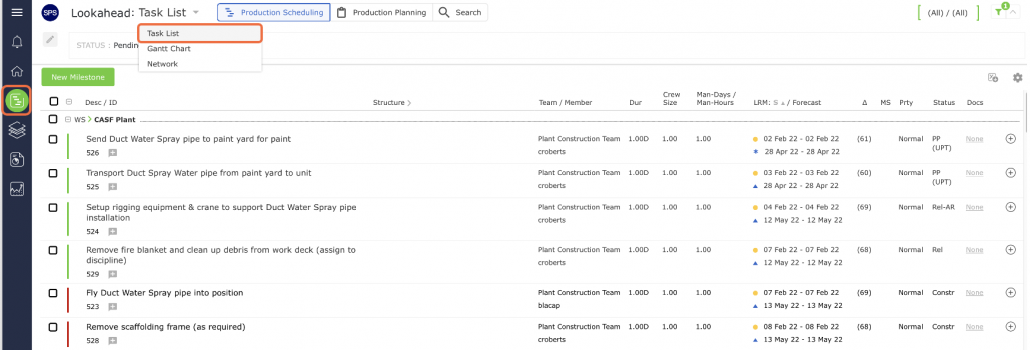
In the Lookahead, each row represents a single task or milestone for which one person is responsible. Each task is uniquely identified by its attributes. These task attributes are the column headings shown in gray and include the task description, responsible team, responsible team member, the number of man-days for the task (if enabled), task start date (LRM and Forecast), task duration, task end date (LRM and Forecast), the variance between the LRM and Forecast dates, whether or not the task is a Milestone, the priority of the task, and the status of the task as well as Date Completed if the task has been completed.
By default, tasks in the Lookahead are grouped by the tasks’ Work Structure which are sorted alphabetically. Within each group, the tasks are sorted by their LRM Start Dates, with the earliest LRM Start Date nearest the top of the data table. If desired, this default sort can be disabled and tasks on the Lookahead can be sorted by any of the underlined column headings, in either ascending or descending order.
Filters
In the Lookahead, you can choose to show or hide the filters by clicking the Filter on the top right of the window.


Filters allow you to view different sets of tasks in the Lookahead. Below the filter icon in the Lookahead view is a gear icon for the grid setting. The grid settings are additional custom filters, which allow you to select a set of tasks that belong to a specific team, a specific team member, and / or have a certain task status. By choosing appropriate filtering conditions, you can view any part of the workflow for the project. In most cases, however, you will want to filter for pending tasks for which you (or your team) are personally responsible.


Legend
As the flow of work is defined through predecessor and successor relationships between tasks. From the Lookahead you can select any task and determine the direct predecessor and successor tasks based on the background colors of the entries. Select a task by clicking once anywhere on the task entry (row). The selected task is always shown with a blue background. Any direct predecessors to the selected task are shown with an orange background and any direct successors are shown with a green background. Be aware that according to how the flow of work is configured, not all predecessors / successors may be shown on the screen. To verify all predecessors / successors related to a task, access Edit Workflow Logic or use the Edit Task options.