
Workflow logic is the set of dependency relationships between the individual tasks, which make up a workstream. In other words, the workflow logic is the order or sequence of the tasks in a workstream. As a specific stream of work progresses, it is often necessary to insert a new task between two existing tasks in the Network Manager and to add or remove dependency relationships between the tasks to accurately represent the new flow of work. Any changes of this type are accomplished by “editing the workflow logic” relating to the tasks.
Deleting a dependency relationship can mean delinking either a predecessor or a successor from a specific task in a workstream.
To remove a dependency in the Network Manager view, complete the steps below:
- Open the Network Manager view as shown in Steps 1 – 4 of Insert Milestone / Task.
- Select the dependency connector between the two tasks of which you wish to delete the dependency, by clicking on the connector. When properly selected, the controls will appear along the line as small boxes. Then either click the Delete control or the Delete key on your keyboard and the dependency will be removed as shown below.
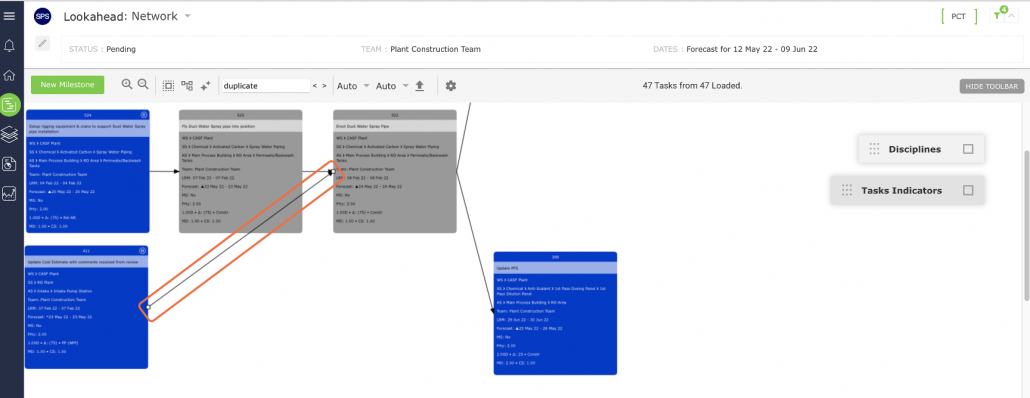
Alternatively, you can delete dependencies by using Task ID’s. To do this, first select the Milestone / Task from which you want to delete the predecessor or successor by clicking once on its shape, then click the Task Details control as shown in the video below.
- Scroll to the Predecessor / Successor detail and click the “X” to the left of the Predecessor or Successor as applicable for the dependency you wish to delete. Both tasks remain in the Network Manager, however, they no longer share a dependency relationship.
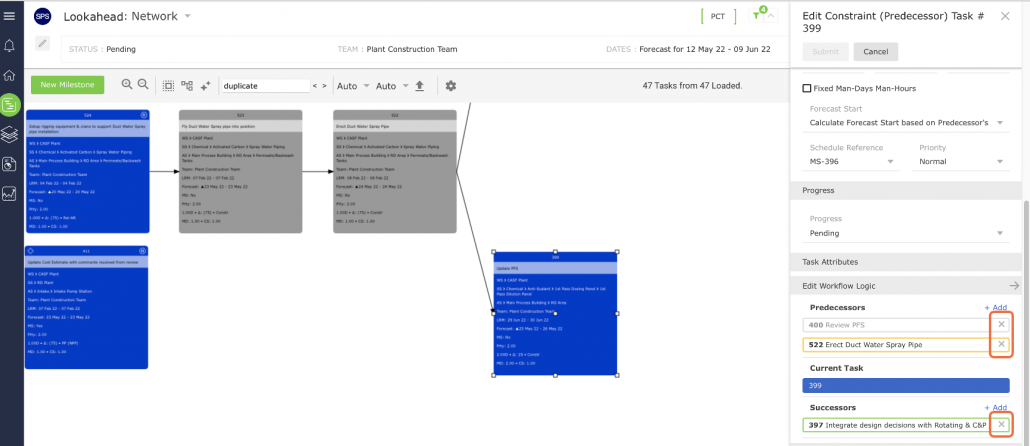
Note: You will not receive a confirmation pop-up when deleting dependencies. A dependency is immediately deleted when you click the “X.” Therefore, to avoid unnecessary rework, ensure you have selected the correct task and dependency before you proceed to click the “X.”
You may need to click the Refresh control if the tasks’ shapes and colors are not appropriately rendered.